 Quessa
For project managers who own the client status call
Give the status answer you'd give with the plan open.
Quessa lives in your Mac's notch during the call. When the client asks about a date, a blocker or the budget, you ask Quessa, and the answer from your own plan and earlier calls streams in within seconds. No bot joins the call.
Join the founding listTry a question a client might ask
Orion prep (sample)
An earlier launch isn't assessed in the prep, so Quessa says so instead of agreeing to a date.
Interactive demo with a sample prep. The meeting and names are fictional. Answers stream in word by word and the panel grows with them, as in the app.
You know the answer. You wrote it down three weeks ago.
“Where are we on budget, roughly?”
The numbers are in your tracker, updated Friday. The client wants one figure, now. You say “I'll send it after” and look less in control than you are.
If one fumbled status answer costs you the client’s trust on a EUR 84,000 project, the call where Quessa had the answer is the one that pays for it.
Three steps. Two of them happen before the call.
Quessa makes your prep
From the calendar invite, your earlier calls on the same topic and the documents you drop in. Read it, edit it, or paste in your own. Quessa answers from this.
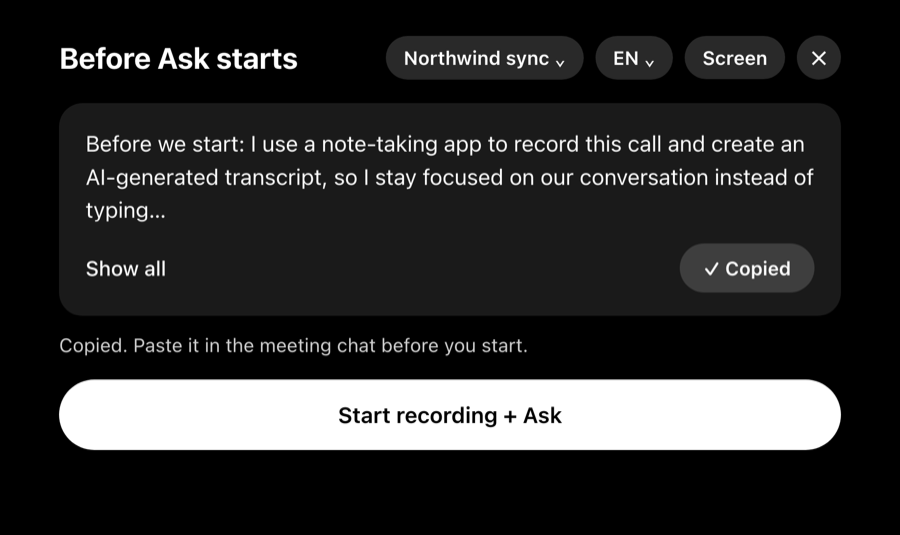
Press Record + Ask
Quessa spots the call and drops out of the notch. You paste a short notice in the meeting chat, or read it out in a room, and press Everyone agreed. Ask doesn't start before that.
Look up
Press ⌃⌥Space and type, or ⌃⌥↩ for "What should I say". The answer streams in, and your keyboard goes back to the meeting.
It only answers from what you gave it.
Prep and the live call
Quessa answers from your prep and the last two minutes of the conversation. If neither holds the answer, it tells you in one line.
No invented prices
It's instructed to quote a price only exactly as it appears in your prep. No estimates, no rounding, no discounts you never offered.
No "sure, that's easy"
It's instructed not to tell you to promise something can be done. It says what exists and what would have to be built, and you decide.
Prepared, not pretending
Ask won't start until you've shared the consent notice and pressed Everyone agreed. If someone says no, press Someone said no and Quessa deletes the recording before anything is uploaded. You did the work, Quessa puts it in front of you on time.
Most assistants answer from the call. Quessa answers from your prep.
Live answers on a call are common now. Most tools answer from the live transcript, your past meetings, a team knowledge base or the web. Quessa answers from the prep you made for this meeting and the last two minutes of the call, nothing else.
| Quessa | Granola | Otter | Fireflies | Cluely | Jamie | Notion | |
|---|---|---|---|---|---|---|---|
| Answers during the call | Yes, Ask | Yes, Chat | Yes, AI Chat | Yes, AskFred | Yes | Yes, Sidekick in the desktop app | Preset skills such as catch me up and suggest questions |
| What the live answer draws on | Your prep for this meeting and the last two minutes of the call | Your notes, transcripts and the files you add. Its pre-meeting brief adds the web. | This meeting and your past meetings | The live meeting, your last 30 days of meetings and the web | The call, your screen, Modes (prompts and files) and, with Smart Mode on, the web | The call so far, past meetings, your connected apps and the web | Not documented |
| Prep for this one meeting | Drafted from the invite, earlier calls and your documents. It asks you what only you can answer. | An automatic brief from past notes, the agenda, the web and Gmail, on Business and Enterprise, for meetings with outside people | A coaching agent built from your team's playbooks, on the Enterprise plan | A brief about 3 hours before, from earlier meetings, the company, the attendees and recent email | Modes per type of call, with files, and automatic pre-call briefs on attendees | Automatic briefings for calendar meetings, once you turn them on | Notes you write before the call shape the summary after it |
| Hidden when you share your screen | Yes, during a call | Not documented | Not documented | Yes, by default | A paid add-on: Pro + Undetectability, USD 149.99 a month, or Enterprise. Off by default. | Not documented | Not documented |
| Notice to the other side | Ask, the live transcript and screen recording wait until you confirm everyone agreed | A chat message or watermark, if you turn it on | A notice email to invitees before the meeting, and a chat message when the bot joins | A chat and audio message on Mac, on by default, when it records without the bot | Not documented | A consent email if you turn it on, and a chat notice in beta | A reminder to you, and a spoken message it can play |
Read from each vendor's own website and help pages on 5 November 2026. Products change. If a cell is out of date, write to hello@quessa.app and we'll fix it.
What Quessa doesn't do
- No notes or summary after the call. You get a full transcript, and Ask during it.
- No web search. If your prep doesn't cover a question, Ask tells you so.
- Mac only, macOS 26 or later.
- Not on-device. Audio goes to ElevenLabs, and your prep and the live transcript go to Anthropic, both in the US.
- No free plan.
See it on the calls you take.
Before, during and after.
Online or in the room
On a video call, Quessa records your microphone and the call's sound. In a meeting room, switch to In person, say how many people will speak, up to 10, and it records through your Mac's microphone. The notice then shows as a card to read aloud.
Record, or Record + Ask
Press Record when you only want the transcript. Press Record + Ask when you want answers during the meeting too.
A full transcript after
When the call ends, Quessa transcribes the whole conversation and saves it on your Mac, with you and them on separate lines.
Off the screen you share
During a call, Quessa's windows don't show up when you share your screen. Your prep stays yours, and the consent notice still tells everyone Quessa is on.
Dictation anywhere
Hold fn and speak, in any app on your Mac, when you're not recording a meeting. Let go and the text is pasted where you were typing, or waits on your clipboard. English, Hungarian or Spanish, up to 60 minutes a day during early access.
Updates inside the app
Quessa checks for a new version once a day and asks before it installs. It never offers one while you're recording, and your transcripts and preps stay where they are.
50 seconds, one hard question.

I build automation systems for clients. My calls are full of questions about things I set up weeks ago: which step retries, what a workflow does when an API is down, what we agreed at kickoff.
I kept the answers in my notes and still lost them mid-sentence. So I built Quessa for my own client calls, and I use it on them. Now I'm opening it to 50 founding members with the same problem, and I run each one's first prep sessions myself. Four seats are already taken.
Tamas Demeter, Campbell Technologies
The questions teams ask first.
Will it make things up?
It answers from your prep and the live transcript, and every answer shows which prep it used and whether the live transcript was in it. When neither covers the question, it tells you so. It's instructed never to quote a price that isn't in your prep. So write the prep for the questions you dread.
Does a bot join the call?
No. Quessa records your Mac's microphone and system audio. Nobody sees an extra participant.
Which call apps does it work with?
It detects calls in Zoom, Google Meet, Microsoft Teams, Webex, Whereby and Slack huddles. For a meeting in a room, switch to In person and it records through your Mac's microphone. It runs on Macs with macOS 26 or later.
Where does the audio go?
To transcribe the meeting, Quessa sends the audio through its server at Cloudflare to ElevenLabs, a speech-to-text provider in the US. The transcript is deleted there once it reaches you, and ElevenLabs may keep the audio for a time under its own terms. While Ask runs, your Mac also streams the audio straight to ElevenLabs for the live transcript, and ElevenLabs keeps a log of it that we cannot delete. The live transcript and your prep go to Anthropic in the US, the maker of Claude, to write the answer, and Quessa also uses Anthropic to draft your prep. We tell you this up front because your clients may ask, and the consent notice names both.
How much work is setup?
Quessa makes the prep for you from the calendar invite, your earlier calls on the same topic and the documents you drop in. You check it. Founding members also prep their next three client calls with me, so the first Asks have something good to answer from.
What if it doesn't help me?
Until you start, your USD 29 comes back any time you ask, no questions. Then the Three-Call Guarantee: if Quessa doesn't answer a real client question from your prep in your first 3 calls, I rebuild the prep with you. If it still doesn't, you get every dollar back.
Join the founding list
Both founding bonuses close on 28 February 2027, or when seat 50 is taken. I run every prep session myself, which is why there are 50, and why 3 start each month.
The Three-Call Guarantee. If Quessa doesn't answer a real client question from your prep in your first 3 calls, I rebuild the prep with you. If it still doesn't, you get every dollar back. Until you start, the deposit is refundable any time, no questions.